
Why Build an Online Course on WordPress?
- Why Build an Online Course on WordPress?
- The Three Models for Adding Courses to WordPress
- 2. The All-in-One Platform (Subdomain Model)
- 3. The Embed or Widget Model
- Benefits of Building an Online Course on WordPress
- What Makes an Online Course Actually Sell?
- Planning Your Course Content for Maximum Engagement
- Building an Online Course on Your Own Terms
Creating an online course on WordPress is one of the smartest ways to monetize your expertise while maintaining complete ownership of your content, branding, and customer relationships. If you already have a WordPress website, you have the perfect foundation for building and selling online courses without relying on third-party marketplaces.
Over 40% of the web runs on WordPress, and thousands of website owners are transforming their existing traffic into recurring revenue through online education. Whether you’re a coach, consultant, educator, or business owner, launching an online course on WordPress allows you to leverage your existing audience while maintaining full control over pricing, student data, and your overall learning experience.
The reality is that creating and selling an online course from your own website is different from launching on a dedicated marketplace like Udemy or Skillshare. On your own site, you control everything — the pricing, the presentation, the student relationship, and the data. But that control comes with the responsibility of choosing the right approach. This article walks you through what it actually takes to add an online course to WordPress, comparing the available models and helping you decide which path is right for your business.

Why Build an Online Course on WordPress?
WordPress wasn’t originally designed for e-learning, but over the years it has evolved into one of the most flexible platforms for selling digital products — including courses. Here is why WordPress site owners have a structural advantage over those starting from scratch on a dedicated course platform:
Built-in audience. If you already have a WordPress site with a blog, product pages, or a service offering, you have traffic. Existing visitors already trust your brand. Adding a course is a natural upsell — you are delivering deeper value to people who already know you. That starting point is something a brand-new subdomain on a course marketplace simply cannot replicate.
Content synergy. Your blog posts, tutorials, and resources naturally feed into course content. Someone reading your “how to start a podcast” guide is a perfect candidate for your comprehensive podcasting course. This organic funnel is one of the most effective (and lowest-cost) ways to fill course seats, and it only works when the blog and the course share the same domain.
SEO continuity. Every page on your WordPress site contributes to your domain authority. When your course lives on your domain — not a subdomain or third-party platform — every lesson page, every sales page, and every student dashboard contributes backlink equity to your main site. Over time, this compounds your search rankings rather than splitting them across separate properties.
The Three Models for Adding Courses to WordPress
Broadly speaking, there are three approaches to putting a course on your WordPress site. Each has trade-offs in cost, complexity, and control. Understanding them is the first step toward making an informed decision.
1. The Plugin Approach
WordPress plugins like LearnDash, Tutor LMS, and LifterLMS turn your site into a full learning management system. You install the plugin, create lessons, set up payment gateways, and manage student enrollments entirely within WordPress.
Pros: Complete control over the user experience. No monthly subscription to a third-party service (beyond the plugin license). All data lives in your WordPress database.
Cons: Significant setup and maintenance overhead. You must manage video hosting separately (often via Amazon S3, Vimeo Pro, or a dedicated video platform). You are responsible for security updates, compatibility issues with other plugins, and performance optimization. Advanced features like gamification, certificates, or drip content often require add-on purchases. A typical LearnDash setup with hosting, video storage, and plugin licenses can cost $500–$1,500 per year before factoring in development time.
2. The All-in-One Platform (Subdomain Model)
Platforms like Teachable, Thinkific, and Kajabi host your course on their infrastructure. You build your curriculum in their editor, and students access it at a subdomain like yourbrand.teachable.com.
Pros: Fast to set up. Video hosting, payment processing, and student management are bundled. No technical maintenance.
Cons: You lose SEO continuity. The subdomain model means search engines treat your course as a separate site. Students leave your branded environment every time they navigate from your main site to the course. Revenue sharing applies on lower-tier plans (Teachable takes 5–10% of your sales). Migrating your content to another platform later is difficult because the content is locked inside their proprietary editor. Monthly fees range from $39 to $399, and the upper tiers still charge transaction fees.
3. The Embed or Widget Model
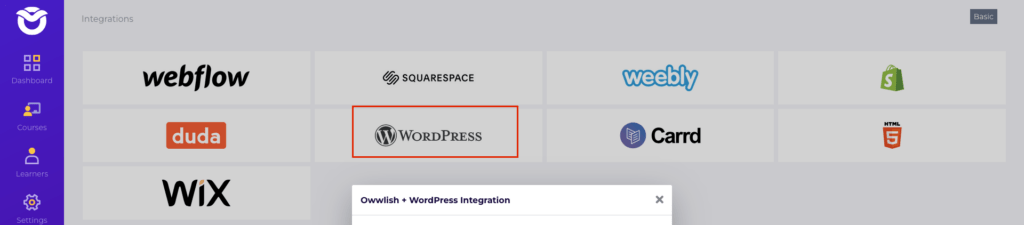
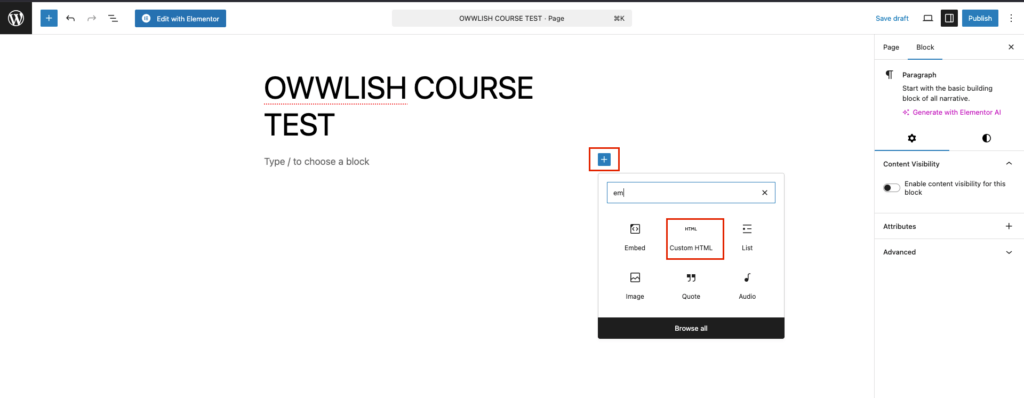
A newer category of services lets you build a course on their platform and then embed it directly into your WordPress pages using a code snippet or widget. The course content is hosted externally but displayed inside your existing WordPress layout — no subdomain, no redirect, no separate URL.
Pros: Fast setup with minimal technical work. The course stays on your domain visually (embedded iframe or widget). Video hosting and payment processing are handled by the service. You can switch site builders (e.g., from WordPress to Squarespace) without rebuilding your course.
Cons: Less granular control over the learning experience compared to a full LMS plugin. You rely on the service for uptime and feature updates. Some services still route students through their checkout flow rather than keeping the entire experience on your site.
Each model serves different needs. A technical site owner with a large budget and a full development team might prefer the control of a plugin LMS. A creator who values speed over everything else might lean toward Teachable despite the subdomain compromise. But for the majority of WordPress site owners who want a professional course experience without the downsides of subdomains or plugin maintenance, the embed model offers the best balance.
Benefits of Building an Online Course on WordPress
Launching an online course on WordPress offers significant advantages over using third-party marketplaces. Your course becomes part of your existing website, helping you build domain authority, strengthen your SEO, and create a consistent brand experience for your students. You also retain complete ownership of your customer data, course pricing, and marketing strategy without depending on another company’s platform or commission structure.
What Makes an Online Course Actually Sell?
Technical setup is only half the equation. The courses that generate consistent revenue share a few common characteristics, regardless of the platform they are built on.
Solve a specific problem. The most successful courses are not “everything you need to know” overviews — they are focused, outcome-driven programs. A course titled “Build a Membership Site in 7 Days” will almost always outperform “The Complete Guide to Online Business.” Specificity signals to the buyer that you understand their exact pain point and have a proven path to solving it.
Pricing reflects perceived value. Pricing an online course is notoriously tricky, but one rule holds steady: price based on the transformation you deliver, not the hours of content. A course that helps a freelancer land a $5,000 client can command $500 or more. A course that teaches basic Instagram tips might struggle at $29. If you are unsure where to start, moderate pricing ($47–$97) with occasional discounts tends to perform well for educational content aimed at small business owners.
Progress tracking drives completion. Students who see their progress — “3 of 12 lessons complete” — are significantly more likely to finish your course than those who do not. Completion rates directly impact word-of-mouth referrals, reviews, and the likelihood that a student purchases another course from you. Built-in student progress tracking is not a “nice to have” feature; it is a core driver of repeat revenue.
Video quality matters more than production value. Your students do not need Hollywood lighting or a professional studio. They do need clear audio, a reasonable frame rate, and well-organized content. Screen recordings with a clear voiceover consistently outperform overly produced videos that sacrifice substance for style. A simple, well-structured lesson recorded on a decent USB microphone will sell better than an expensive studio video with shallow content.
Planning Your Course Content for Maximum Engagement
Before you record a single video, map out your curriculum on paper. The most effective course structures follow a simple pattern:
Module 1: Foundation — What the student needs to know before anything else. Keep this short and action-oriented. The goal is to get the student a quick win within the first 24 hours of enrolling, which builds momentum and reduces the likelihood of abandonment.
Modules 2–4: Core skills — This is where the real transformation happens. Each module should build on the previous one. Include one quiz or exercise per module. Practical application, not passive watching, is what drives actual learning outcomes.
Final module: Putting it all together — A capstone project, case study, or integration exercise that requires the student to apply everything they have learned. This is also a natural place to offer a certificate of completion, which adds perceived value and gives students something to share on LinkedIn or their portfolio.
Building an Online Course on Your Own Terms

Adding an online course to your WordPress site is one of the highest-leverage moves you can make as a content creator or business owner. The infrastructure exists. Your audience is already there. The question is which approach aligns with your technical comfort level, your budget, and your long-term goals.
If you want the complete control of a plugin LMS and have the resources to maintain it, that path is well established. If you prefer the speed of an all-in-one platform and can accept the subdomain trade-off, options like Teachable and Thinkific deliver. But if you want the best of both worlds — a professional course experience that lives on your domain, requires no plugin maintenance, and lets you keep every dollar you earn — start your free Owwlish trial today and add your first course to WordPress in under an hour.