Running promotions is one of the easiest ways to boost course sales, but until now, applying discounts could feel clunky. With Owwlish’s latest update, you can now offer course discounts with coupon codes for one-time or recurring payments directly through Stripe Checkout — giving you more flexibility while keeping the checkout experience clean and professional.
In this guide, we’ll walk you through how the feature works, why it matters, and how to set it up step by step.
Table of Contents
Why Use Coupons for Course Discounts?
Here’s what makes this update valuable:
- Cleaner Checkout – Hide the coupon field when you’re not running promotions, so learners only see what’s relevant.
- Private Offers – Share discounts with select learners (e.g., email subscribers, affiliates, or beta testers) without making them public.
- Premium Experience – For full-price courses, keeping the checkout page minimalist reinforces your brand’s value.
- Flexibility – Turn the promo code field on or off whenever you need, no coding required.
How Course Discounts Work with Stripe Checkout
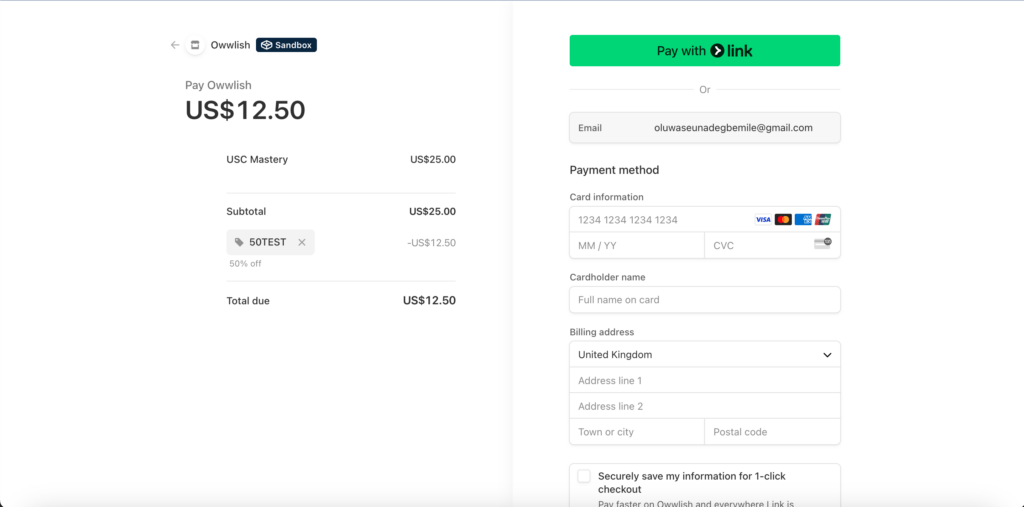
When enabled, learners will see a “Promo Code” field on your Stripe-hosted checkout page. They can enter a valid coupon code you’ve created in Stripe, and the discount is applied instantly to their course payment.
If you disable the feature, the field disappears — giving you a clean, distraction-free checkout page.
Step-by-Step Setup Guide
Here’s how to enable and manage coupon codes in Owwlish:
1. Enable Stripe Hosted Checkout in Owwlish
- Log into your Owwlish account.
- Open the Course Edit screen for the course you want to update.
- Scroll to the Stripe Checkout Settings section.
- Toggle “Enable Stripe Hosted Checkout” on.

2. Show or Hide the Promo Code Field
- While still in the Course Edit screen, scroll to Stripe Checkout Settings.
- Toggle “Show Promotion Code Field” on if you want learners to enter coupon codes.
- Leave it off if you don’t want coupons visible.

3. Create Your Coupon in Stripe
- Log into your Stripe Dashboard.
- Open the Coupons page (under Product catalog).
- Click + Add Coupon.
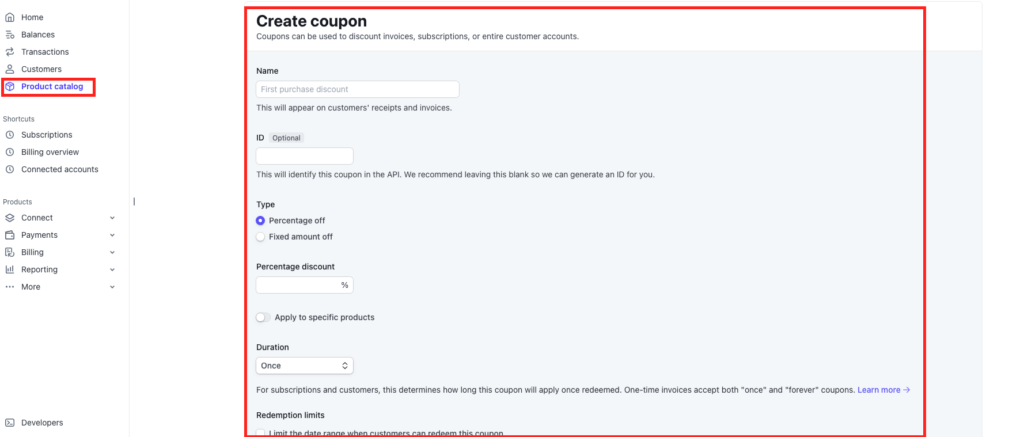
- Enter your coupon details:
- Discount Type (percentage or fixed amount)
- Duration (once, multiple months, or forever)
- Name / Promo Code learners will use
- Save your settings.
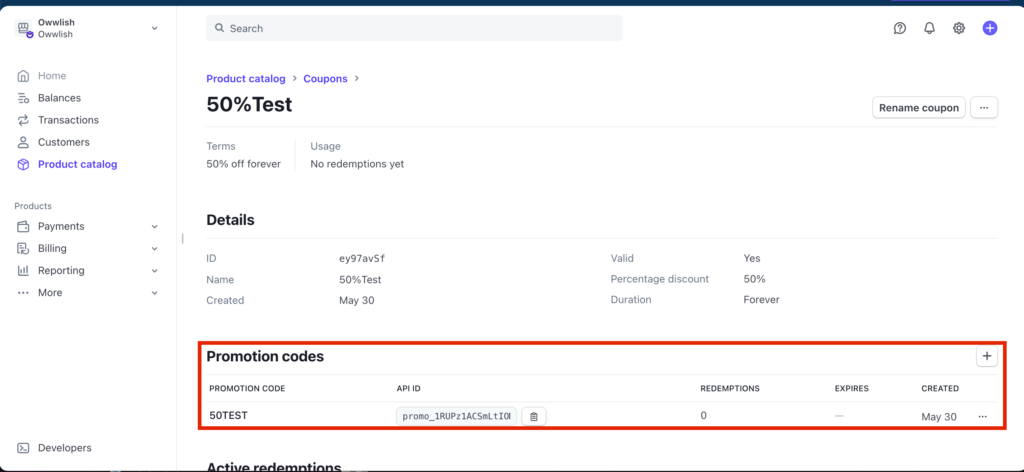
4. Sync & Test Your Setup
- Go back to Owwlish and make sure your Stripe integration is synced.
- Open your course checkout page as a learner would.
- Enter your promo code to confirm it applies correctly.
Pro Tips for Running Course Discounts
- Flash Sales – Enable the coupon field only during limited-time promotions, then hide it again when the sale ends.
- Segmented Discounts – Share private promo codes with select groups (e.g., newsletter subscribers or early-bird registrants).
- Recurring Subscriptions – Coupons can apply not just to one-time payments, but also to recurring subscriptions – perfect for ongoing memberships.
Final Thoughts
The new coupon feature is a simple but powerful addition to Owwlish. It lets you offer course discounts on your terms, run smarter promotions, clean up your checkout flow, and create a premium learner experience, all while keeping everything in sync with Stripe.
If you’d like a full walkthrough with visuals, check out our Knowledge Base guide or watch our step-by-step video tutorial.
Want to see everything else you can do with your course checkout? Browse the Owwlish features or compare plans and pricing.